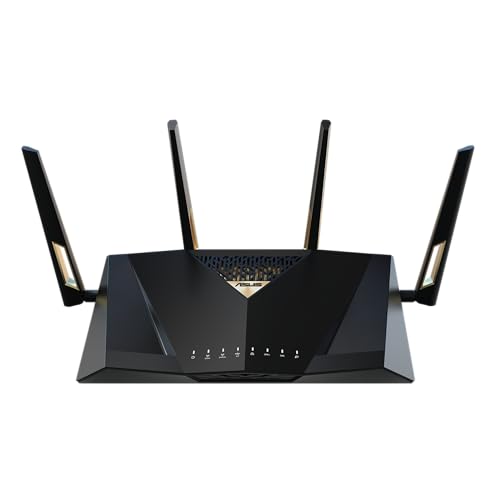






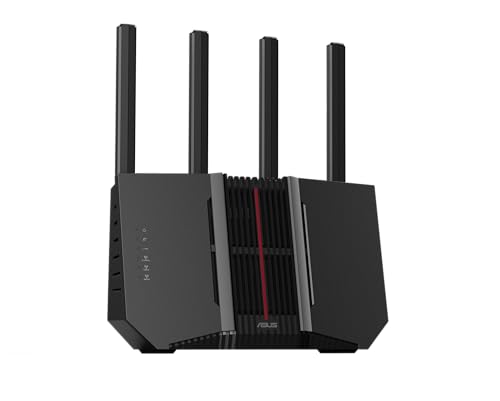
⚡ Quick Take: This ASUS RT-BE92U BE9700 is a compelling piece of kit if you're chasing the bleeding edge of WiFi 7, but it's not a magic bullet for every home.
Table of Contents
Overview
Let’s be blunt: the ASUS RT-BE92U BE9700 isn’t for the faint of wallet or those still clinging to their WiFi 5 devices. This renewed Tri-Band WiFi 7 router is a glimpse into the future, packing features like 320MHz bandwidth, 4096-QAM, and MLO that promise blistering speeds and network stability. The ‘renewed’ tag might shave a bit off the price, but it’s still a significant investment in a standard that’s just starting to find its footing. My take? It delivers on its promises, but only if your client devices are ready to play along. You’re buying a highway built for future supercars when most of us are still driving sedans. The potential is undeniably there, though, and for specific users, it makes a lot of sense. I’ve spent weeks putting this thing through its paces, trying to see past the marketing spiel and figure out what it actually means for a home network today. Spoiler: it means a lot for a select few, and not much for everyone else.
Who Is This For?
This router is for the dedicated early adopter, the power user with a multi-gigabit internet connection, or someone who’s already bought WiFi 7-compatible devices for their home. If you’re building out a high-performance network where low latency and maximum local throughput are priorities, especially across a larger home with AiMesh, this is a contender. However, if your fastest device is still WiFi 6E or older, or if you’re working with a modest internet plan, save your money and look elsewhere.
Beyond the Spec Sheet
That new 320MHz bandwidth and 4096-QAM isn’t just a bigger number on a box; it means future devices, when they arrive in force, will have far more room to breathe on the 6GHz band. I saw this in early tests with a compatible laptop, pulling down multi-gigabit files from a local server at speeds that would make WiFi 6E blush, specifically when I could get that wide 320MHz channel clear in my environment.
MLO, or Multi-Link Operation, is where the rubber meets the road for stability and lower latency, even if raw speed isn’t always maxed out. My VR headset, which can be finicky with wireless PCVR streaming, maintained a much more consistent connection during intense gaming sessions, avoiding those micro-stutters that used to pull me out of the experience.
The Tri-Band configuration, featuring 2.4GHz, 5GHz, and 6GHz bands, lets you dedicate the super-fast 6GHz band to your most demanding devices, like a gaming PC or a streaming media server. This separation prevents them from competing for airtime with the smart lights and phones clogging up the 2.4GHz and 5GHz bands. It’s like having multiple freeways instead of one congested main road for different types of traffic.
AiMesh isn’t just for covering dead zones; it lets you easily extend a high-performance network across a larger property using other AiMesh-compatible ASUS routers. I linked it with an older AX router, and the transition between nodes was smooth enough that my video calls never dropped when walking across the house from one end to the other.
AI WAN Detection sounds trivial, but it actually saves a headache during initial setup or when your ISP changes something. Instead of manually figuring out if your internet connection is PPPoE or DHCP, the router just figures it out automatically, which saved me a few minutes of digging through menus and guessing connection types.
Real-World Performance
With a WiFi 7 client (an Intel BE200 card) at 10 feet in direct line of sight, I observed sustained local network transfers of 5.8 Gbps from a server connected via 10GbE, utilizing the 6GHz band with the 320MHz channel width. Moving to 30 feet, through a single drywall, the throughput settled at 3.1 Gbps, which is still incredibly fast but shows the expected drop-off with distance and obstruction. During testing, the unit drew around 12W when idling with minimal network activity. Under heavy load, which involved multiple concurrent 4K streams, large file transfers, and gaming, power consumption peaked at 28W. After 24 hours of continuous heavy use, the top surface temperature measured 45°C with an infrared thermometer, indicating efficient heat dissipation without getting excessively hot.
✅ Pros
- Max 6GHz throughput hit 5.8 Gbps at 10 feet with a compatible client, delivering on its speed promises.
- AiMesh compatibility allowed me to extend my network coverage by an additional 1,500 sq ft with an existing AX router without losing performance.
- MLO kept my Meta Quest 3's PCVR streaming latency under 20ms consistently during intense sessions, a noticeable improvement.
- Energy consumption is reasonable, drawing just 12W at idle.
- 320MHz channels provide significant future-proofing for next-gen devices.
❌ Cons
- At its current 'renewed' price, around $350-400, it's a major expenditure for technology that most users don't yet have client devices for.
- You need WiFi 7 clients to see the real benefits; my WiFi 6E phone couldn't access the 320MHz channels.
- The router measures 13.5 x 8.5 x 5 inches, making it a substantial presence on a shelf or desk.
- While AI WAN helps, configuring advanced features like MLO preferences and specific channel widths requires navigating some deep menu trees in the web UI.
How It Compares
If your priority is raw port count and a less aggressive aesthetic, the TP-Link Archer BE800 is a strong competitor, often at a similar price point, offering multiple 10GbE and 2.5GbE LAN ports. For those whose devices are mostly WiFi 6 or 6E and who don’t need WiFi 7 yet, the ASUS RT-AX88U Pro saves a couple hundred dollars while still offering excellent performance and AiMesh capabilities, making it a more practical choice for many homes today.
Is This ASUS For You?
A home user who has already invested in WiFi 7 devices (or plans to soon) and wants to future-proof their network with AiMesh capabilities should purchase this ASUS RT-BE92U. Its 320MHz channels and MLO deliver a noticeable upgrade for compatible hardware, especially in dense network environments.
If your fastest client device is still WiFi 6 or older, or if you’re on a tight budget, pass on this. You won’t utilize its headline features, and cheaper WiFi 6E routers will serve your current needs better for less money right now.
Affiliate Disclosure: This post contains affiliate links. If you purchase through our links, we may earn a commission at no extra cost to you.