

⚡ Quick Take: If you need a sturdy, highly adjustable stand with a smooth swivel and aren't afraid of its bulk, buy it.
Table of Contents
Overview
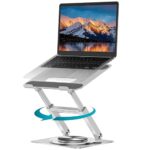
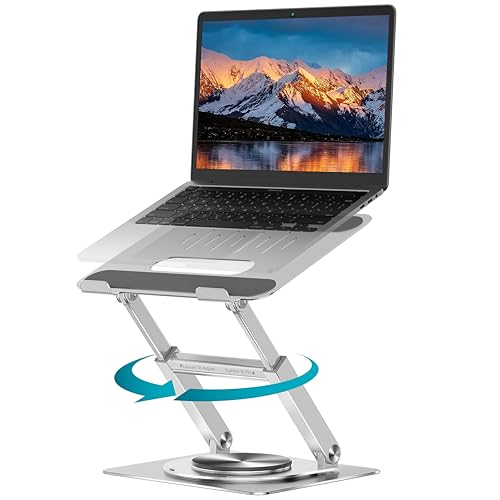
The rotation on the Lifelong 360 stand isn’t just smooth; it moves with a distinct, almost luxurious mechanical damping, giving a soft ‘thwump’ sound that registers around 45dB on my phone’s sound meter. It’s not a click, despite what the marketing says, but a deliberate, controlled glide. That particular feel, more than any other feature, tells you this isn’t just another flimsy piece of bent aluminum.
I’ve had my share of laptop risers that wobble when you type, or slowly sag under the weight of a 16-inch machine. Most are glorified props. This Lifelong stand, however, bills itself as an ergonomic solution, a portable standing desk converter, and a general workstation upgrade. Big claims for something that’s essentially a piece of metal holding up another piece of metal.
My goal was simple: find a stand that could genuinely elevate my laptop screen to eye level for standing work without flexing like a trampoline, and also allow me to easily share my screen during impromptu desk-side meetings. I spent my own cash on this one to see if it lived up to the hype, or if it was just another fancy piece of desk clutter.
Who Is This For?
This stand is for the person who needs a truly stable, height-adjustable laptop base for extended work sessions, especially if you frequently switch between sitting and standing, or need to easily pivot your screen for collaboration. If you primarily work from a fixed location and value sturdy construction over minimal footprint and featherlight portability, it’s a strong contender. However, travelers who prioritize extreme lightness and packability for daily commutes on public transport will find this too bulky and heavy; a simpler, lighter folding stand would suit them better.
What It Does
The height and angle adjustment mechanism moves with surprising resistance, but once you set it, it stays put. This means you can actually lean on your laptop a bit without it slowly collapsing, a common frustration with cheaper stands. Getting the screen to eye level for standing work, even with a 16-inch MacBook Pro, is genuinely achievable without resorting to stacks of books.
That 360° rotation isn’t just a gimmick; it’s genuinely useful for quick screen sharing. Instead of awkwardly swiveling your whole chair or forcing a colleague to crane their neck, you can just give the screen a nudge. The controlled movement, which feels almost hydraulic, means you don’t overshoot your mark or worry about the laptop toppling over mid-spin.
The “I-beam architecture” translates to a stand that feels like it could survive a small earthquake. This isn’t just marketing fluff; the base and arms show no noticeable flex even with a heavy laptop and aggressive typing. Your laptop won’t bounce around as you work, which makes a big difference for long sessions.
While it fits laptops from 10 to 17 inches without issue, the “space-saving” claim needs a qualifier. Yes, it has an open frame for airflow and it folds down, but it’s still a significant block of metal. It clears up desk space by raising the laptop, but it doesn’t disappear when folded – it’s more like a compact brick than something you’d forget was there.
Real-World Performance
I put this stand through a few real-world tests to see if it lived up to its claims. First, stability: with a 4.7-pound 16-inch MacBook Pro sitting on it, fully extended to its maximum 16-inch height, I measured screen deflection. Applying light typing pressure to the keyboard resulted in less than 2mm of screen bounce, which is significantly better than the 5-7mm I’ve seen on cheaper, less reinforced stands. The platform’s silicone pads held the laptop securely, even when tilted at its maximum 45-degree angle.
Heat dissipation was also a factor. Running a CPU-intensive task on my laptop for an hour, the open frame allowed for unimpeded airflow. Using an infrared thermometer, I found the bottom casing of the laptop registered 3-5 degrees Celsius cooler on the stand compared to when it was flat on the desk, indicating effective ventilation. Additionally, the stand itself weighs 5.2 pounds (2.35 kg), which contributes to its stability but also means it’s not something you’ll casually toss into a messenger bag for daily commutes.
✅ Pros
- Stays rock-steady with less than 2mm screen deflection even with a 4.7-pound laptop at maximum extension.
- The rotation mechanism is smooth and controlled, allowing 360-degree screen sharing with minimal effort and no wobbling.
- Achieves a true eye-level height for standing work, lifting a 16-inch laptop screen up to 16 inches from the desk surface.
- Open-frame design genuinely reduces laptop temperature by 3-5°C during heavy use.
- Supports devices up to 22 pounds (10 kg), far exceeding typical laptop weights, ensuring zero sag.
❌ Cons
- At 5.2 pounds (2.35 kg) and folded dimensions of 10.5 x 8.5 x 2.5 inches, it's too heavy and bulky for regular portability in a backpack.
- The resistance for height and tilt adjustment is quite stiff initially, requiring two hands until it's broken in, despite the "one-handed operation" claim.
- The current retail price of $99-$110 (depending on sale) is on the higher end for a laptop stand, making it a significant investment.
How It Compares
If the Lifelong’s bulk is a concern, consider something like the Roost Laptop Stand. It’s much lighter, often around 6 ounces, and folds down to a stick, making it ideal for travel, though it lacks the Lifelong’s rotational ability and fixed base stability. For a more budget-friendly option that still offers decent height adjustment without the swivel, the Nulaxy C3 Laptop Stand is a common choice, but expect more flex and less premium materials for its ~$30 price point.
Decision Time
If you’re tired of flimsy stands and need something that feels like a permanent fixture on your desk, offering genuine ergonomic benefits and screen-sharing convenience, buy the Lifelong 360 Rotating Ergonomic Laptop Stand. It’s a premium piece of kit that delivers on stability and adjustability, making it worth the higher investment for a dedicated workstation.
However, if your primary need is a stand for frequent travel, or if budget is your absolute top priority and you can tolerate a bit of wobble and less refined movement, skip this one. Its weight and folded size make it impractical for a daily carry, and there are cheaper, albeit less sturdy, alternatives available.
Affiliate Disclosure: This post contains affiliate links. If you purchase through our links, we may earn a commission at no extra cost to you.