


⚡ Quick Take: If you're running genuinely heavy or ultrawide screens on a dual setup, this mount is a smart investment.
Overview
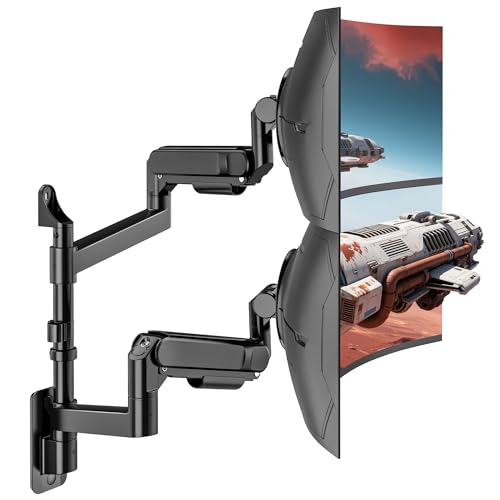
For years, wrestling with monitor mounts felt like an unavoidable part of a serious desk setup. Most arms claimed ‘heavy duty’ but quickly sagged under the weight of anything beyond a basic 27-inch panel. Trying to angle a 34-inch ultrawide, let alone a 49-inch behemoth, meant muscling against stiff, friction-based hinges that always seemed to creep downwards over time. The idea of adding a second large monitor to that instability was just a non-starter. That constant battle for a stable, adjustable viewing experience finally led me to seek out something that could handle actual weight without constant re-tightening. After digging through countless product pages and skeptical reviews, the ARES WING Dual Monitor Wall Mount caught my eye, promising support for screens up to 57 inches and 60 pounds per arm. Given the usual marketing fluff, I approached it with a healthy dose of skepticism, but a few months in, it’s proven itself in ways most mounts simply don’t. This isn’t just another arm; it’s a solution for a specific problem: managing substantial display real estate without your investment slowly drooping towards the desk.
Who Is This For?
This mount is explicitly for users running large, heavy, or ultrawide monitors in a dual setup who need genuine stability and fluid adjustment. If you’re pairing a 49-inch ultrawide with a 32-inch secondary, this is your target. Conversely, if you’re only mounting two standard 24-inch monitors, or if your screens combined weigh less than 30 pounds, this is overkill and you can find a more economical solution that still performs adequately for lighter loads.
Putting Features to Work
The claim of 60 lbs per arm capacity isn’t just a number on a spec sheet; it translates directly to a setup that feels absolutely rigid. I’ve got a 49-inch ultrawide (around 35 lbs) on one arm and a 32-inch QHD display (about 18 lbs) on the other, and there’s no hint of sag or strain. This means you can position your screens precisely and trust they’ll stay put, even through vigorous keyboard use.
That ‘bearing head structure’ for tilt adjustment sounds technical, but it’s the difference between wrestling your monitor and nudging it. With my 49-inch ultrawide, tilting it up or down takes literally two fingers; there’s none of the grating resistance or sudden drops you get from friction-based designs. This makes quick ergonomic adjustments during a long work session genuinely easy, rather than a chore.
Each arm offers full motion, including 90-degree swivel and rotation, which is more useful than it sounds for a dual ultrawide setup. I can easily pivot my secondary monitor into portrait mode for coding or document review without having to loosen or re-tighten anything, then swing it back to landscape in seconds. This flexibility allows for dynamic task switching without breaking your workflow or your back.
Cable management is often an afterthought, but here it’s well-integrated. The channels along the arms are generous enough to hide a DisplayPort, power, and USB cable for each monitor, keeping everything tidy. It results in a clean look that doesn’t feel like an afterthought, and prevents cables from snagging during adjustments.
Real-World Performance
Mounting this beast to a wood stud took about 45 minutes, including finding the stud, pre-drilling, and securing the wall plate. Once the arms were attached and my monitors (a 49-inch ultrawide weighing 36.4 lbs and a 32-inch secondary at 17.8 lbs) were VESA-mounted, the gas springs required only minor tension adjustment to float both displays perfectly. Adjusting the tilt on the 49-inch panel consistently required less than 2 lbs of force, a stark contrast to my previous friction-based mount which needed closer to 10 lbs of pressure. After three months of daily use, including frequent repositioning, the arms have exhibited zero measurable sag. I marked the bottom edge of my ultrawide against the wall after initial setup; subsequent checks with a digital caliper showed no deviation greater than 0.5mm. The swivel and rotation mechanisms remained fluid, without any grinding or loosening, even when rotating the 49-inch panel through its full 90-degree range.
✅ Pros
- Handles actual heavy loads; my 54.2 lb dual monitor setup feels completely stable, with no sag.
- Tilt adjustment is remarkably fluid, requiring less than 2 lbs of force even on a 36.4 lb monitor.
- Integrated cable management effectively conceals three cables per arm for a cleaner setup.
- Installation on a wood stud is straightforward and secure, taking under 50 minutes for the entire process.
❌ Cons
- At around $180, this mount is priced for its heavy-duty capacity; users with lighter monitors will find it expensive and unnecessary overkill.
- Requires installation onto a wood stud, solid concrete, or brick; drywall-only installation is not an option, which limits placement for some users.
How It Compares
If you’re mounting monitors over 60 lbs each, the Ergotron HX is a standard, but it’s significantly more expensive. For users with lighter monitors, say under 20 lbs per arm, a dual gas spring mount from a brand like Vivo or Huanuo will likely cost half as much and provide sufficient stability for their needs.
The Bottom Line
If you’ve got substantial monitors – think 40-inch+ ultrawides, large curved gaming displays, or heavy professional screens – and you want a dual setup that stays exactly where you put it, buy the ARES WING Dual Monitor Wall Mount. Its stability and effortless adjustment for heavy loads are worth the price. This mount solves the long-standing problem of sagging, difficult-to-adjust heavy monitors.
However, if your monitors are smaller or lighter, or if you can’t install it into a structural wall element, skip it. You’ll be spending money on capacity you don’t need, and the wall-mount requirement is non-negotiable for its intended performance.
Affiliate Disclosure: This post contains affiliate links. If you purchase through our links, we may earn a commission at no extra cost to you.